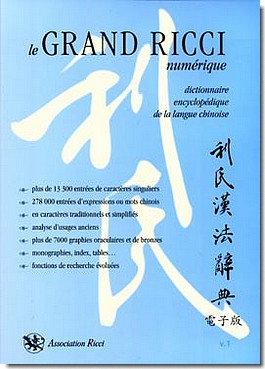
Le Grand Ricci now available on DVD

cover of le Grand Ricci numeriqueThe magnificent Grand dictionnaire Ricci de la langue chinoise, better known as le Grand Ricci, has just been released on DVD, almost a decade after its release in book form and exactly four hundred years after the death of Matteo Ricci.

The list price is 120 euros (about US$150), which is much cheaper than the printed edition. A long video in French (16:31) discusses the work. For those who would prefer something in English, a PDF gives background information on the dictionary project.

For a sample of the dictionary’s format and entries, see the 25 pages of entries for shan. Alas, as this example shows, the entries are not word parsed. But at least Hanyu Pinyin is now available for those who prefer it to Wade-Giles.

As long as I’m mentioning Ricci-related work, I might as well use the occasion to note that the Taipei Ricci Institute is putting its collection of books on permanent loan to Taiwan’s National Central Library.

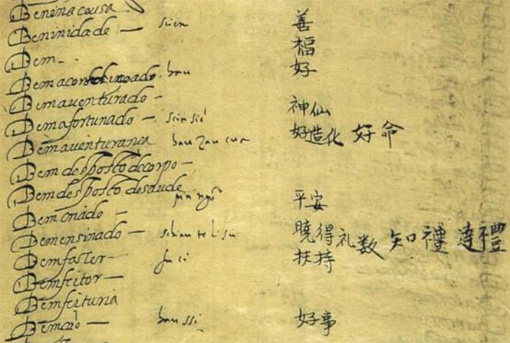
Also, I’d like to note that parts of Matteo Ricci’s original dictionary can now be viewed through the Google Books scan of a publication from earlier this century of his Dicionário Português-Chinês.

Enjoy.

image from a manuscript page of Ricci's original dictionary

OMG, it’s Hanzified English

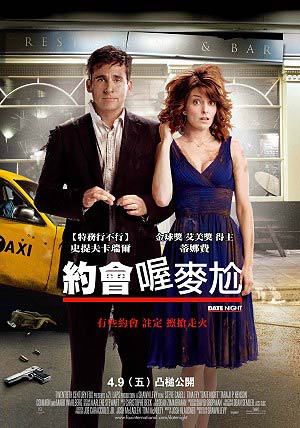
Taiwanese movie poster in Mandarin for 'Date Night', a.k.a. '約會喔麥尬'In Taiwan, the new movie Date Night has been given the Mandarin title Yuēhuì o mài gà (約會喔麥尬/约会喔麦尬).

Yuēhuì is simply the word for “date.” The interesting part is “o mài gà” (喔麥尬), which is a Mandarinized form of the English “oh my god.” (I wonder if this, being written in Hanzi despite still being basically English, would pass China’s new need for supposed purity.)

Most people here — especially those younger than about 40 — would simply write “oh my god” (or, less frequently, “o my god”) in English in the middle of an otherwise Mandarin text. (I’ll spare everyone the chart of Google searches; but it backs this up.) But brevity is standard in movie titles here, and “喔麥尬” is a lot more compact on a movie poster than “oh my god.” This, however, raises the question of why “喔麥尬” instead of the equally concise “OMG”. I don’t know the answer to that. But the path of lettered words in Mandarin is certainly not without twists and turns.

Like most other uses of Hanzified English, the results are not entirely faithful to the original sounds.

Mandarin’s ou would be a closer phonetic fit than o for the English “oh”.
There’s Ōu (區/区), a surname. But most of the time this Chinese character is pronounced (being one of those many Chinese characters with multiple pronunciations), so that certainly wouldn’t work well. There’s ǒu, which has a more clearly phonetic Hanzi (嘔/呕), but which has to do with vomit (ǒutù/嘔吐/呕吐). Another possible choice would be ōu (歐/欧); but that is associated mainly with Europe and doesn’t get used much as a phonetic component in non-Europe-related loan words outside the word for ohm: ōumǔ (歐姆/欧姆).

Mài (the Mandarin word for wheat), unlike most other Mandarin morphemes pronounced mai (various tones), gets used phonetically in lots of various loan words, such as Màidāngláo (McDonald’s/麥當勞/麦当劳), Màijiā (Mecca/麥加/麦加), Dānmài (Denmark/丹麥/丹麦), and Kāmàilóng (Cameroon/喀麥隆/喀麦隆). So its use is to be expected, though semantically there’s no link. And mài is certainly a better fit for the English my than it is for the Mc of McDonald’s, the Mec of Mecca, the mark of Denmark, or the me of Cameroon.

For ga there’s not a lot of choice. 咖 is often seen in the phonetic loan gālí (curry). The biggest problem here is that the same 咖 is also used as in a different, common phonetic loan: kāfēi (coffee). There’s 嘎; but, like 尬, it’s not exactly a well-known character.

Anyway, I could go on for a long time listing various possibilities. But the main point is that Chinese characters just don’t do well at this sort of thing.

As for Pinyin, I suppose the orthography could get interesting: o mài gà, o màigà, omài gà, or omàigà. But a Pinyin orthography would probably simply encourage people to write this in the original: oh my god.

BTW, you may wish to try the following experiment. The in o mài gà is most often seen in writing the word gāngà (尷尬/尴尬), which means awkward/embarrassed. Ask native speakers of Mandarin to write gāngà in Hanzi for you by hand without using a dictionary, a computer, or any other form of assistance. I bet that most people — even those with university degrees — won’t be able to write this common, ordinary word correctly.

And for lagniappe, the character 尬 is also sometimes seen in written Taiwanese as the equivalent of Mandarin’s jiā (加/add). I spotted an example of this just the other day on a cafe sign (in the sense of “buy something and ga something else for a special price”) but didn’t have a camera with me.

Combining Pinyin and Chinese character subtitles

With any luck, this will be the last post for some time in my none too exciting but hopefully useful series on technical aspects of creating Pinyin subtitles.

Some people like to have Pinyin subtitles and Hanzi subtitles appear at the same time. Although I think that’s generally a bad idea (too much text to get through quickly that way, people would benefit from becoming accustomed to reading Pinyin texts as Pinyin texts, etc.), I’ll go ahead and offer instructions on how to make Pinyin subtitles appear above Chinese character subtitles.

These directions are for Microsoft Word, though other programs could be used instead.

Using Word, open copies of the two subtitle files you’d like to combine.

To get the alignment between the two files to match when they’re combined, it’s important that each subtitle entry is only one line long. You can check for possible instances of multi-line subtitles with a wildcard search (CTRL+H –> More –> Use wildcards).

Find what (with “Use wildcards” checked):
([!0-9])^13([!0-9^13])

If that search finds any multi-line subtitles, you’ll need to temporarily adjust those lines in both subtitle files, as follows:

Find what (with “Use wildcards” checked):
([!0-9])^13([!0-9^13])

Replace with:
\1|\2

Again, be sure to run that search-and-replace in both subtitle files. You’ll replace the “|” with a RETURN later.

Next, in the file with the Chinese characters (not the Pinyin file) strip out everything except for the text of the subtitles, leaving just the Hanzi text. (I wrote about this earlier in How to strip subtitle files down to text. The method is also useful for removing such information if you want to create the text of the screenplay.)

Find what (with “Use wildcards” checked):
^13[0-9:\,\-\> ]{1,}^13

Replace with:
^p

Note: You may need to run the above “replace all” twice for Word to catch everything.

You should have something that looks like this (with paragraph marks shown):


喲! 李爺來啦

李爺來啦

秀蓮

秀蓮

秀蓮,李慕白來啦

Now add extra lines, so the lines with Chinese characters will fit into the new document in the correct places.

Find what (with “Use wildcards” checked):
^13^13

Replace with:
^p^p^p^p^p

Delete the very first line — the one with the “1″ in it. Then add three blank lines above this.

You should have something that looks like this (with paragraph marks shown):


喲! 李爺來啦


李爺來啦


秀蓮

Select all (CTRL+A). Then convert this to a table:
Table –> Convert –> Text to Table

Now switch to the Pinyin subtitles file.

First, add the extra lines blank lines into which you will later insert the Chinese characters that correspond with the Pinyin.

Find what (with “Use wildcards” checked):
^13^13

Replace with:
^p^p^p

Convert the Pinyin subtitles to a table:
CTRL+A
Table –> Convert –> Text to Table

Switch back to the Chinese character file. Copy the table there and paste it to the right of the table with the Pinyin text.

You should have something that looks like this:

1  
00:00:49,000 –> 00:00:51,500  
Yō! Lǐ yé lái la  
  喲! 李爺來啦
   
2  
00:00:52,200 –> 00:00:53,600  
Lǐ yé lái la  
  李爺來啦
   
3  
00:01:06,900 –> 00:01:08,400  
Xiùlián  
  秀蓮
   
4  
00:01:09,000 –> 00:01:10,400  
Xiùlián  
  秀蓮

Next, change this back into text:
Table –> Convert –> Table to Text

Remove the tabs:
Find what:
^t

Replace with:
[leave blank]

If you combined any lines earlier, break them apart now:
Find what:
|

Replace with:
^p

Your document should now look like this:

1
00:00:49,000 –> 00:00:51,500
Yō! Lǐ yé lái la
喲! 李爺來啦

2
00:00:52,200 –> 00:00:53,600
Lǐ yé lái la
李爺來啦

3
00:01:06,900 –> 00:01:08,400
Xiùlián
秀蓮

4
00:01:09,000 –> 00:01:10,400
Xiùlián
秀蓮

Save the file as plain text (*.txt), not as a Word document (*.doc). Then later rename this to give it the correct file extension (probably *.srt).

See also:

How to create Hanyu Pinyin subtitles

Since posting about the Pinyin subtitles for Crouching Tiger, Hidden Dragon and The Story of Stuff I have received several messages inquiring about how someone might make Pinyin subtitles themselves. So I might as well put the answer online.

Although at the present stage of software implementation subtitle conversion isn’t as simple as pushing a button, the process is not particularly difficult, assuming you have a good source text to work from. But this does require some time and the right tools.

The Right Tools

The most important tool is, of course, the one that performs the conversion to Hanyu Pinyin. And it’s crucial to keep in mind that not all Pinyin converters are created equal; in fact, the vast majority of so-called Pinyin converters are best avoided entirely. The world does not need any more texts in the hobbled, poorly written mess that many people erroneously think of as Hanyu Pinyin; but it very much needs texts in real Hanyu Pinyin. So don’t waste your time with a program that doesn’t do a good job of word parsing, etc.

At present the clear front-runner for converting Chinese characters to Hanyu Pinyin texts (real Hanyu Pinyin texts) with a minimum need for user assistance is Key Chinese (Windows and Mac). The demo version is fully functional for 30 days. Key’s considerably less expensive “Hanzi To Pinyin With Tones Conversion Utility” for MS Word texts (also with a 30-day demo) would probably also work well, though I haven’t tried it myself.

Wenlin (Windows and Mac) is another excellent program that can produce properly spelled and word-parsed Hanyu Pinyin. But it requires users to run some disambiguation themselves, which can take a lot of time when you’re talking about something with as much text as a screenplay. Nonetheless, Wenlin’s incorporation of John DeFrancis’s ABC Chinese-English Comprehensive Dictionary makes it a helpful reference when performing post-conversion checks. Also, especially if one does not have Key, Wenlin — even the function-limited but non-expiring demo version — is useful for handling some adjustments (such as removing tone marks or providing a workaround when dealing with programs that don’t handle Chinese characters well).

You’ll also need a Unicode-friendly text editor with good support of regular expressions (to allow wildcard searches). I like Em Editor, which is Windows based. But lots of other programs would work. One could even use MS Word if so inclined.

Finally, having subtitles in an additional language (usually but not necessarily English) is often desirable, not just for others who would use these subtitles but for yourself as you create the Pinyin subtitles. But often the subtitles one may find in Mandarin are not in synch with those in another language. Software can fix this problem. But I don’t have enough experience with this to recommend certain programs over others.

To sum up, the tools I recommend for creating Hanyu Pinyin subtitles are

  1. Key Chinese
  2. Wenlin
  3. EmEditor (or another Unicode-friendly text editor)
  4. a subtitle synchronizer

Actually, just the first one, Key, is sufficient to produce Pinyin subtitles. But in my experience using a combination of all four programs is preferable.

Now it’s time to get down to business.

The Main Steps

  1. acquire source-version subtitles
  2. synchronize subtitle files
  3. identify names of the movie’s characters (dramatis personae)
  4. perform initial conversion of subtitles in Chinese characters to Pinyin
  5. double check the results and perform necessary cleanup
  6. create additional version without tone marks
  7. share your work

1. Acquire subtitles for conversion and reference

At present the most useful site for finding Mandarin subtitles written in Chinese characters is probably Shooter. You may need to try searching for your desired title in both simplified and traditional characters. Also, be aware that movies — especially movies not filmed in Mandarin — often have different names in China, Taiwan, Hong Kong, etc.

You may find it useful to look for subtitles in other languages, too. Shooter can be useful for that, though you may have better luck finding English subtitles at Opensubtitles.org or similar English-language sites.

One can often find different subtitle files for the same movie, so you may wish to examine more than one for quality. Another thing that’s worth keeping in mind: Converting from traditional Chinese characters to simplified Chinese characters is less problematic than vice versa.

2. Synchronize subtitle files

Once you have the files, you should synchronize them with each other according to the directions for the particular program you are using.

If the program you’re using for this chokes on Chinese characters, though, you’ll need to take a couple extra steps. First, convert the Chinese characters to Unicode numerical character references using either Pinyin Info’s NCR conversion tool or Wenlin (full or demo version). The reason for this is that even synchronizers that screw up “李慕白” should be able to handle the NCR equivalent: “李慕白”.

In Wenlin,
Edit –> Make transformed copy –> Encode &#; [decimal]

Take the NCR text and synchronize the files. After you get this taken care of, reconvert to Chinese characters.

In Wenlin,
Edit –> Make transformed copy –> Decode &#;

3. identify names of the movie’s characters

You must teach your software know which strings of Hanzi represent names. For example, it’s crucial for clarity that the character name “李慕白” is written “Lǐ Mùbái” rather than as “lǐ mù bái“. This part takes some time up front. But do not skip this step, because it is not only crucial but will save a lot of trouble in the long run.

Before doing this, however, people may want to refamiliarize themselves with Hanyu Pinyin’s rules for proper nouns (PDF). Note especially what is supposed to be capitalized and what isn’t.

The Mandarin version of Wikipedia is one resource that can be helpful in identifying the names of at least the main characters in the movie. But you’ll want to look for more names and forms than will be listed there. Keep in mind that characters aren’t always addressed by their full names. You need to look for other forms as well (e.g., in Crouching Tiger, Hidden Dragon Li Mubai is sometimes referred to as “Li Mubai” but other times as “Li ye” or simply as “Mubai”) and enter them.

English subtitles can be very useful for locating most proper nouns in the text. (Hooray for word parsing and capitalization of proper nouns!) The following search of an English subtitle file should help pinpoint the location of proper nouns.

find (with “Match Case” and “Use Regular Expressions” checked):
[^\.]\s[A-Z][a-z]

in MS Word, find (with “Use wildcards” checked):
[!\.] [A-Z][a-z]

Since you’ve already synchronized your subtitles, you’ll easily be able to find the corresponding point in the Mandarin subtitles by looking at the time the line appears.

As you gather the names, or after you compile the full list, add your findings to the Pinyin converter’s user dictionary. In Key, perform Language –> Add Record, then fill in the Hanzi and Pinyin fields.

4. Perform initial conversion to Pinyin

OK, I know you’re eager to run the conversion and see all of those Hanzi turn into lovely Hanyu Pinyin. But there’s one quick step you need to do first. If you’re using Key Chinese, the program won’t make use of all of those character names you just painstakingly added to the user dictionary unless you first run “linguistic reconstruction” on the subtitles you wish to convert:
Language –> Linguistic Reconstruction

Now you’re ready for the big step:
Language –> Convert to Pinyin

5. Double check the results and perform necessary cleanup

Unfortunately, most Pinyin converters — even the best — tend to be lazy about inserting spaces in some of the places they belong, such as around numeric and alphabetic strings. For example, “自3月22日(星期一)起至5月31日(星期一)” will generally convert to something that looks like this:
“zì3yuè22rì (Xīngqīyī) qǐ zhì5yuè31rì (Xīngqīyī)”.
But it should look like this:
“zì 3 yuè 22 rì (Xīngqīyī) qǐ zhì 5 yuè 31 rì (Xīngqīyī)”.

To fix this in your Pinyin text, run the following regular expression in EmEditor. Make sure “Match Case” is not checked.
find:
([a-zāáǎàēéěèīíǐìōóǒòūúǔùǖǘǚǜ])([0-9]+)([a-zāáǎàēéěèīíǐìōóǒòūúǔùǖǘǚǜ])

replace:
\1 \2 \3

If you do this in Word, you’ll need to use the following instead in your wildcard search.
find:
([A-Za-zĀÁǍÀĒÉĚÈĪÍǏÌŌÓǑÒŪÚǓÙǕǗǙǛāáǎàēéěèīíǐìōóǒòūúǔùǖǘǚǜ])([0-9]{1,})([A-Za-zĀÁǍÀĒÉĚÈĪÍǏÌŌÓǑÒŪÚǓÙǕǗǙǛāáǎàēéěèīíǐìōóǒòūúǔùǖǘǚǜ])

replace:
\1 \2 \3

The rest of cleanup work usually involves you simply reading through the text, looking for errors, perhaps while listening to the movie.

6. Create additional version without tone marks

If you have Key, this is very easy: Highlight the entire text, then
Format –> Strip Tone Marks.

And you’re done, though because Key keeps u-umlaut as such, if your television or other device doesn’t show the letter ü correctly you may wish to convert “ü” to “v”.

If you don’t have Key or access to another program that can do the same thing as easily, then use a combination of Wenlin (again, even the demo will do what you need) and a text editor. First, paste your Pinyin text into Wenlin. Then select all of the text and perform
Edit –> Make transformed copy… –> Replace tone marks with 1-4

Copy and paste the results into a new document in your text editor. Then run the following search-and-replace. Make certain the “Use Regular Expressions” or “Use Wildcards” box is checked.

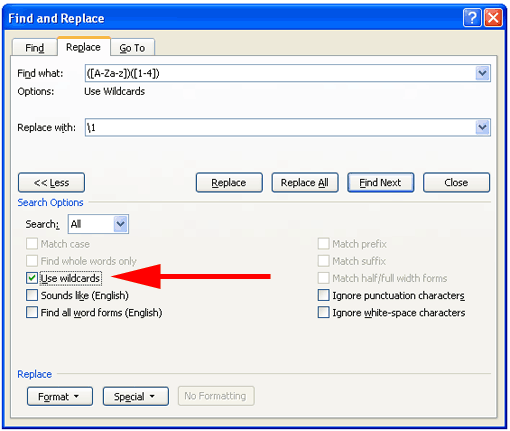
find:
([A-Za-z])([1-4])

replace with:
\1
Then click “Replace All”.

What this looks like in EmEditor:
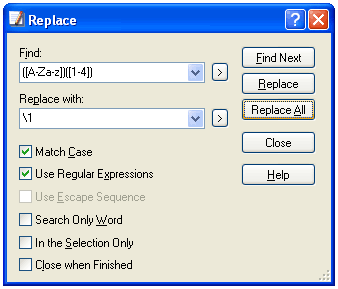
image showing the search-and-replace dialog box for the above

What this looks like in MS Word:

7. Share your work

It’s much better if people can concentrate on producing new material rather than having to redo things others have already taken care of. So if you make a good Hanyu Pinyin version of something, please let me know.

Pinyin subtitles for ‘The Story of Stuff’

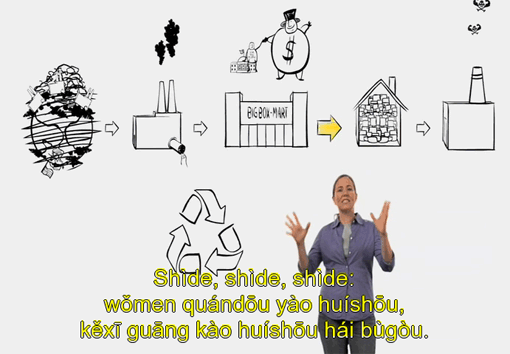
screenshot from the video, showing Pinyin subtitles: Shìde, shìde, shìde: w?men quánd?u yào huísh?u, k?x? gu?ng kào huísh?u hái bùgòu.

The Story of Stuff is a 20-minute video on the costs and absurdities of having a culture wrapped up in unchecked consumerism. It gained especially wide attention after the New York Times published a front-page article about it. A related book was released earlier this month.

The entire video can be downloaded freely in high- and low-resolution versions. And now there’s a collection of subtitles of possible interest to many readers of Pinyin News.

The zip file contains seven subtitle files:

  • Hanyu Pinyin with tone marks
  • Hanyu Pinyin without tone marks
  • traditional Chinese characters (Unicode)
  • traditional Chinese characters (Big5)
  • simplified Chinese characters (Unicode)
  • simplified Chinese characters (GB)
  • English

The star of the video, author Annie Leonard, has a lot to get through in just 20 or so minutes, so many people may find it easier, at least at first, to read the Pinyin subtitles that do not include tone marks.

Pinyin subtitles for Crouching Tiger, Hidden Dragon

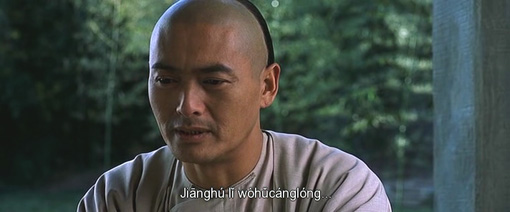
Er, someone has created Hanyu Pinyin subtitles for the film Crouching Tiger, Hidden Dragon (Wòhǔcánglóng / 臥虎藏龍 / 卧虎藏龙). They’re in UTF-8 (Unicode) and come in two varieties: one with tone marks (link above), the other without. The latter would be useful primarily for those who have trouble getting diacritics to appear properly, such as many of those watching the movie through a TV hooked up to a DivX DVD player.

The set of subtitles also includes English and Mandarin in Chinese characters (both traditional and simplified versions).

The subtitles might seem to go by a bit quickly. But that’s generally because people don’t have much experience reading Hanyu Pinyin. (Also, the English subtitles leave out a lot. But the Pinyin ones are comprehensive.) Practice reading and you’ll get much faster at it.

Remember to use these only for good (e.g., practice reading Pinyin, Mandarin learning, helping those with problems reading Chinese characters) and not bad (e.g., piracy).

still from the movie, showing the subtitled text of Li Mubai saying 'Jianghu li wohucanglong'

How to learn real Mandarin: an anecdote

The following is a guest post by Professor Victor H. Mair of the University of Pennsylvania’s Department of East Asian Languages and Civilizations.

The personal names used in the original correspondence have been changed to generational designations.

Compared to the Hànzì-centric pedagogical approach which forces little children to memorize extremely difficult and complicated characters like 老鼠 and 蝴蝶 instead of teaching them lǎoshǔ and húdié, today I received some more hopeful and sane news.

A friend of mine is teaching her grandson Mandarin. The way she is doing it is to write out the Xī yóu jì (Journey to the West) in a simple báihuà paraphrase using Pinyin only (with glosses in English for new vocabulary). My friend is a first-generation immigrant to America, and her daughter married a German who was studying in the United States, so that makes the grandson third-generation Chinese-American/German.

The other day, the grandson asked his mom out of the blue: “What’s the difference between shíjiān, shídài, and shífèn?” My friend, the grandmother, explained to me that all of these terms were in the Pinyin text that she had prepared for her grandson, and that she had glossed them as “time” or “period.” She said that the boy’s mother was very pleased, and she was tickled too, because the boy had discerned the common element shí by himself. As my friend (the grandmother) put it, “He spends very little time on Chinese, so we were pleasantly surprised.”

Hearing this account from my friend, I wrote to her: “Thank you so much for the TRULY WONDERFUL story you wrote about your grandson. This is how to learn real Chinese!!!! And you are being a real Chinese teacher to teach your grandson this way. And I’m also happy that your daughter appreciates what you and her son are doing together. Tell your grandson I’m really impressed at the intelligence of his question.”

Google Translate and rōmaji

The following is a guest post by Professor J. Marshall Unger of the Ohio State University’s Department of East Asian Languages and Literatures.

The challenge

On 18 November 2009, Mark Swofford posted an item on his website pinyin.info criticizing the way Google Translate produces Hanyu Pinyin from standard Chinese text. He concluded by saying, “Google Translate will also romanize Japanese texts written in kanji and kana, Russian texts written in Cyrillic, etc. But I’ll leave those to others to analyze.” So I decided to take up Swofford’s challenge as it pertains to Japanese. Using Google Translate, I romanized a news item from the Asahi of 6 December 2009:

Original Google Translate
6日午後4時35分ごろ、東京都千代田区皇居外苑の都道(内堀通り)の二重橋前交差点で、中国からの観光客の40代の男性が乗用車にはねられ、全身を強く打って間もなく死亡した。車は歩道に乗り上げて歩いていた男性(69)もはね、男性は頭を強く打って意識不明の重体。丸の内署は、運転していた東京都港区白金3丁目、会社役員高橋延拓容疑者(24)を自動車運転過失傷害の疑いで現行犯逮捕し、容疑を同致死に切り替えて調べている。 roku nichi gogo yon ji san go fun goro , tōkyō to chiyoda ku kōkyogaien no todō ( uchibori dōri ) no nijūbashi zen kōsaten de , chūgoku kara no kankō kyaku no yon zero dai no dansei ga jōyōsha ni hane rare , zenshin wo tsuyoku u~tsu te mamonaku shibō shi ta . kuruma wa hodō ni noriage te arui te i ta dansei ( roku kyū ) mo hane , dansei wa atama wo tsuyoku u~tsu te ishiki fumei no jūtai . marunouchi sho wa , unten shi te i ta tōkyō to minato ku hakkin san chōme , kaisha yakuin takahashi nobe tsubuse yōgi sha ( ni yon ) wo jidōsha unten kashitsu shōgai no utagai de genkō han taiho shi , yōgi wo dō chishi ni kirikae te shirabe te iru .
 同署によると、死亡した男性は横断歩道を歩いて渡っていたところを直進してきた車にはねられた。車は左に急ハンドルを切り、車道と歩道の境に置かれた仮設のさくをはね上げ、歩道に乗り上げたという。さくは歩道でランニングをしていた男性(34)に当たり、男性は両足に軽いけが。 dōsho ni yoru to , shibō shi ta dansei wa ōdan hodō wo arui te wata~tsu te i ta tokoro wo chokushin shi te ki ta kuruma ni hane rare ta . kuruma wa hidari ni kyū handoru wo kiri , shadō to hodō no sakai ni oka re ta kasetsu no saku wo haneage , hodō ni noriage ta to iu . saku wa hodō de ran’ningu wo shi te i ta dansei ( san yon ) ni atari , dansei wa ryōashi ni karui kega .
 同署は、死亡した男性の身元確認を進めるとともに、当時の交差点の信号の状況を調べている。 dōsho wa , shibō shi ta dansei no mimoto kakunin wo susumeru totomoni , tōji no kōsaten no shingō no jōkyō wo shirabe te iru .
 現場周辺は東京観光のスポットの一つだが、最近はジョギングを楽しむ人も増えている。 genba shūhen wa tōkyō kankō no supotto no hitotsu da ga , saikin wa jogingu wo tanoshimu hito mo fue te iru .

Google’s romanization algorithm does a thoroughly mediocre job compared with what a human transcriber would do. To see this, compare the following:

Google Translate human transcriber
roku nichi gogo yon ji san go fun goro , tōkyō to chiyoda ku kōkyogaien no todō ( uchibori dōri ) no nijūbashi zen kōsaten de , chūgoku kara no kankō kyaku no yon zero dai no dansei ga jōyōsha ni hane rare , zenshin wo tsuyoku u~tsu te mamonaku shibō shi ta . kuruma wa hodō ni noriage te arui te i ta dansei ( roku kyū ) mo hane , dansei wa atama wo tsuyoku u~tsu te ishiki fumei no jūtai . marunouchi sho wa , unten shi te i ta tōkyō to minato ku hakkin san chōme , kaisha yakuin takahashi nobe tsubuse yōgi sha ( ni yon ) wo jidōsha unten kashitsu shōgai no utagai de genkō han taiho shi , yōgi wo dō chishi ni kirikae te shirabe te iru . Muika gogo yo-ji sanjūgo-fun goro, Tōkyō-to Chiyoda-ku Kōkyo Gaien no todō (Uchibori dōri) no Nijūbashi-zen kōsaten de, Chūgoku kara no kankō-kyaku no yonjū-dai no dansei ga jōyōsha ni hanerare, zenshin o tsuyoku utte mamonaku shibō-shita. Kuruma wa hodō ni noriagete aruite ita dansei (rokujūkyū) mo hane, dansei wa atama o tsuyoku utte ishiki fumei no jūtai. Marunouchi-sho wa, unten-shite ita Tōkyō-to Minato-ku Shirogane san-chōme, kaisha yakuin Takahashi Nobuhiro yōgisha (nijūyon) o jidōsha unten kashitsu shōgai no utagai de genkōhan taiho-shi, yōgi o dō-chishi ni kirikaete shirabete iru.
dōsho ni yoru to , shibō shi ta dansei wa ōdan hodō wo arui te wata~tsu te i ta tokoro wo chokushin shi te ki ta kuruma ni hane rare ta . kuruma wa hidari ni kyū handoru wo kiri , shadō to hodō no sakai ni oka re ta kasetsu no saku wo haneage , hodō ni noriage ta to iu . saku wa hodō de ran’ningu wo shi te i ta dansei ( san yon ) ni atari , dansei wa ryōashi ni karui kega . Dō-sho ni yoru to, shibō-shita dansei wa ōdan hodō o aruite watatte ita tokoro o chokushin-shite kita kuruma ni hanerareta. Kuruma wa hidari ni kyū-handoru o kiri, shadō to hodō no sakai ni okareta kasetsu no saku o haneage, hodō ni noriageta to iu. Saku wa hodō de ranningu o shite ita dansei (sanjūyon) ni atari, dansei wa ryōashi ni karui kega.
dōsho wa , shibō shi ta dansei no mimoto kakunin wo susumeru totomoni , tōji no kōsaten no shingō no jōkyō wo shirabe te iru . Dō-sho wa, shibō-shita dansei no mimoto kakunin o susumeru to tomo ni, tōji no kōsaten no shingō no jōkyō o shirabete iru.
genba shūhen wa tōkyō kankō no supotto no hitotsu da ga , saikin wa jogingu wo tanoshimu hito mo fue te iru . Genba shūhen wa Tōkyō kankō no supotto no hitotsu da ga, saikin wa jogingu o tanoshimu hito mo fuete iru.

For the sake of comparison, I have retained Google’s Hepburn-style romanization. The following changes have been made in the text in the righthand column:

  1. Misread words have been rewritten. Many involve numerals; e.g. muika for “roku nichi”, yo-ji for “yon ji”, sanjūgo-fun for “san go fun”. The personal name Nobuhiro is an educated guess, but “Nobetsubuse” is certainly wrong. Shirogane for “hakkin” is a place-name (N.B. Google did not produce *hakukin, indicating that the algorithm does more than just character-by-character on-yomi).
  2. False spaces and consequent misreadings have been eliminated. E.g. hanerare for “hane rare”, wattate ita for “wata~tsu te i ta”.
  3. Run-together phrases have been parsed correctly. E.g. to tomo ni for “totomoni”.
  4. Capitalization of proper nouns and the first words in sentences has been introduced.
  5. Hyphens are used conservatively for prefixes and suffixes, and for compound verbs with suru.
  6. Obsolete “wo” for the particle o has been eliminated. (N.B. Google did not produce *ha for the particle wa, so “wo” for o is just the result of laziness.)
  7. Apostrophes after n to indicate mora nasals in positions where they are not needed have been eliminated.
  8. Punctuation has been normalized to match for romanized format and paragraph indentations have been restored.

One could make the romanized text more easily readable by restoring arabic numerals, italicizing gairaigo, and so on. Of course, if the reporter knew that his/her copy would be reported orally or in romanization, s/he might have chosen different wording to avoid homophonic ambiguities. E.g., Marunouchi-sho could be Marunouchi Keisatsu-sho, though perhaps in the context of a traffic accident story, it is obvious that the suffix sho denotes ‘police station’. Furthermore, in a digraphic Japan, homophones might not be such as great problem. If, for instance, readers were accumstomed to seeing dōsho for 同所 ‘same place’, then dō-sho would immediately signal that something different was meant, which, given context, might be entirely sufficient to eliminate misunderstanding.

But having said all that, my guess is that the romanization function of Google Translate was programmed with some care. Rather than criticize the quality Google’s algorithm, I suggest pursuing the logical consequences of assuming that it deserves about a B+ by current standards.

Analysis

Clearly, there is a vast amount of knowledge an editor needs if s/he wants to bring Google’s result up to an acceptable level of romanization for human consumption. That minimal level, in turn, is probably a far cry from what a committee of linguists might decide would be an ideal romanization for daily use in 21st-century Japan. It is quite obvious why Google’s algorithm blunders — the reasons were well understood and described long ago (e.g. in Unger 1987) — and though the algorithm can be improved, it can never produce perfect results. Computers cannot read minds, and mindreading is ultimately what it would take to produce a flawless romanization.1

Furthermore, imagine the representation of the words of the text that presumably takes shape in some form or other in the mind of the skilled reader of the original text. Given that Google’s programmers are doing their best to get their computers to identify words and their forms from Japanese textual data, it is clear that readers, who achieve excellent comprehension with little or no conscious effort, must be doing vastly more. The sequence of stages — from (1) the original text to (2) the Google transcription, (3) the better edited version, (4) some future “ideal” romanization scheme, and onward to (5) whatever the brain of the skilled reader ultimately distills and comprehends — concretely illustrates how, at each stage, different kinds of information — from the easily programmable to genuine expert knowledge — must be brought to bear on the raw data.

Of course, something similar can be said of English texts as well: like Chinese characters, orthographic words of English, even though written with letters of the roman alphabet, typically function both logographically and phonographically. The English reader has to do some work too. But how much? Think of the sequence of stages just described in reverse order. The step from the mind of an expert reader (5) to an ideal romanization (4) is short compared with the distance down to the crude level of romanization produced by Google Translate (2). Yet Google does quite a bit relative to the original text (1). It does not totally fail, but rather makes mistakes, which, as just demonstrated, a human editor can identify and correct. It manages to find many word boundaries and no doubt could do better if the company’s programmers consulted some linguists and exerted themselves more. The point is that Japanese readers must cover the whole distance from the text to genuine comprehension, a distance that must be much greater than that traversed by the practiced reader of English, for all its quaint anachronistic spellings. With a decent, standardized roman orthography, the Japanese reader would have a considerably shorter distance to negotiate.

Note

  1. Indeed, starting in the 1980s, Asahi pioneered in the use of an IBM-designed system called NELSON (New Editing and Layout System of Newspapers) that uses large-array keyboards (descriptive input) rather than the sort of kanji henkan methods (transcriptive input) common on personal computers and dedicated word-processing systems. Consequently, the expedient of storing the underlying roman or kana input stream alongside the selected characters is not available for Asahi stories. Of course, such information is routinely thrown away by many other input systems too.