Pinyin.Info home readings rules tools systems Pinyin News links contact
These sites originally created large cells, and so had their eric benet ringtones mounted atop high towers; the towers were designed so that as the system expandedand cell sizes shrankthe antennae could be lowered on their original masts to reduce range.Until the early 1990s, most 24hours ringtone phones were too large to be carried in a jacket pocket, so they were typically installed in vehicles as car phones.Up to 255 further devices can be inactive, or california dream ringtone, which the master device can bring into active status at any time.By simply bringing two devices into close range (around 10cm), special ringtone free can securely take place without entering a passkey or manual configuration.Some devices, such as mobile phones, usually camila todo cambio ringtone OBEX business cards and notes without any pairing or prompts.This procedure might be modified if one of the devices has a ringtones im blue PIN, e.g. for headsets or similar devices with a restricted user interface.In the United States many unwanted but working mobile phones are donated to women's plush ringtone to allow emergency communication.

computers

Archived Posts from this Category

new tools for writing Pinyin

Posted by Pinyin Info on 13 Oct 2008 | Tagged as: Chinese, Firefox, Hanyu, Mandarin, computers, pinyin, software, tone marks

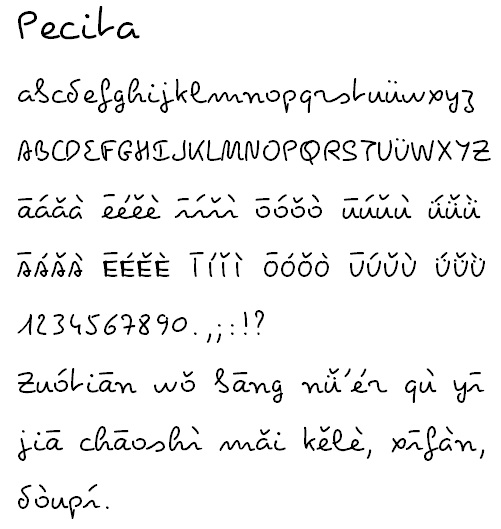
I’ve received word from software writers of not one but two useful new tools for writing Hanyu Pinyin with tone marks (i.e., not using Pinyin to enter Chinese characters but really writing Hanyu Pinyin texts).

Pīnyīn Editor, by Bengt Moss-Petersen, is an online tool that currently works best with IE 6+ and Firefox.

click to visit the online Pinyin editor

(I made text much larger than the default size, since I had to reduce the image to make it fit in my blog. Users can choose among several sizes and fonts.)

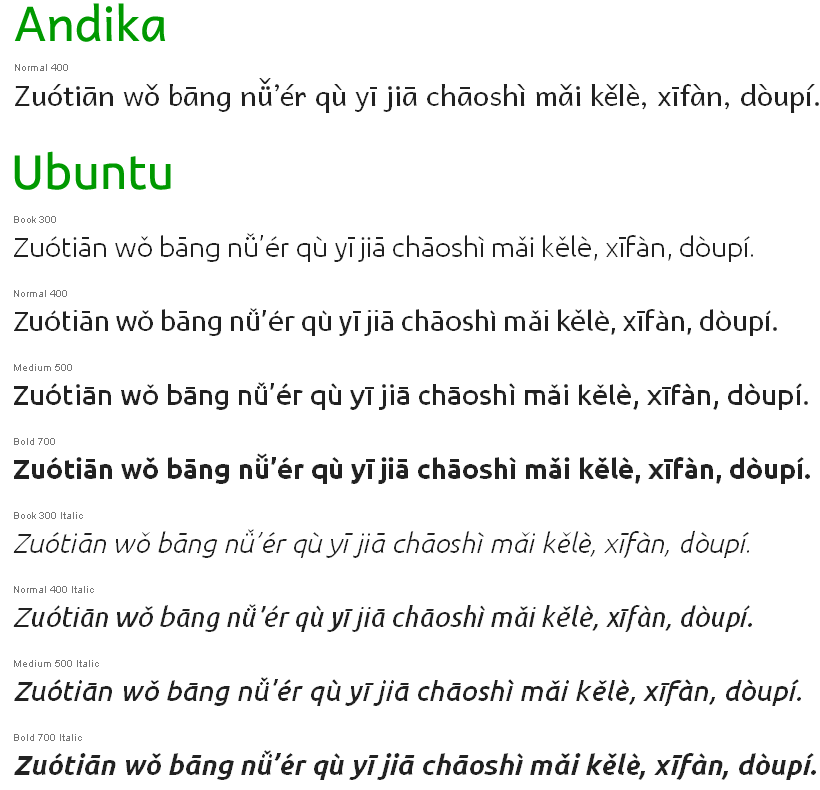
And Pinyin Builder, by Wayne Kirk, is freeware for Windows systems.

click to visit the download page for Pinyin Builder

If you have an open Microsoft Office document, clicking Pinyin Builder’s “GO” button will insert your Pinyin text into that document. You don’t need to bother with copying and pasting.

In both of these, ü + tone mark is produced by v + tone number. Pinyin Builder also offers a combination using the CTRL key.

The tone number can be entered either immediately after the vowel or later in the syllable (e.g., zho1ng, zhong1, and zhon1g all yield “zhōng”). Pinyin Editor also offers the option to simply click on buttons with the vowels and tone marks.

I hope people make frequent use of both of these terrific new tools.

Related:

convert Chinese characters to Unicode character references: javascript

Posted by Pinyin Info on 09 Oct 2008 | Tagged as: Chinese characters, computers, software, unicode

I’ve had a spate of requests recently for the code for Pinyin.info’s tool that converts Chinese characters to Unicode numeric character references (i.e., something that converts, say, “漢語拼音” into “漢語拼音”). Since I’m a believer in open-source work — and since people could find the code anyway if they look carefully enough in the Web page’s source code — I might as well publish it.

This tool can be very handy when making Web pages that use a variety of scripts. (It works on Cyrillic, etc., as well.) I often employ it myself.

Here’s the heart of the code:


function convertToEntities() {
var tstr = document.form.unicode.value;
var bstr = '';
for(i=0; i<tstr.length; i++)
{
if(tstr.charCodeAt(i)>127)
{
bstr += '&#' + tstr.charCodeAt(i) + ';';
}
else
{
bstr += tstr.charAt(i);
}
}
document.form.entity.value = bstr;
}

This sleek little bit of Javascript is originally by Steve Minutillo and used here on Pinyin.info with his permission. I may have tweaked the code a little myself; but that was so long ago I don’t remember well. (I’ve had the converter here for about five years.) Anyway, if you use this please acknowledge Steve’s authorship; and of course I always greatly appreciate links back to Pinyin.info.

If anyone knows how to do the same thing in PHP — preferably with no more code than used above, please let me know.

See also: separating Pinyin syllables: PHP code.

John DeFrancis video

Posted by Pinyin Info on 17 Sep 2008 | Tagged as: China, Chinese, Chinese characters, John DeFrancis, Lu Xun, Mandarin, alphabet, computers, languages, linguistics, pinyin, romanization, teach Chinese, writing systems

John DeFrancisTen years ago John DeFrancis was awarded the Chinese Language Teachers Association’s first lifetime achievement award. Since he could not be present at the association’s annual conference to receive the award, he sent a videotape of a 12-minute acceptance speech. The video was recently edited down to 6:27 and uploaded to YouTube: John DeFrancis remarks.

Here’s my summary of the main points:

0:00 — While working on what he intended to be a largely political study of Chinese nationalism, DeFrancis encountered references to people who wanted China to adopt an alphabetic writing system, an idea which he initially dismissed. But discovering Lu Xun’s interest in romanization led him to investigate the matter further. [I'm frustrated by the cut away from this discussion. Perhaps a fuller version of the video will be posted later.]
1:30 — Emphasizes he’s not in favor of completely abandoning Chinese characters. Rather, he favors digraphia.
2:30 — “I’d like to mention three aspects of the Chinese field which have interested me.”

  1. pedagogy (2:50) — lots of advancements
  2. linguistic aspect (3:20) — that’s also progressing well
  3. socio-linguistics (3:52) — the field isn’t doing as well as it should be

5:00 — computers and Chinese characters. DeFrancis tears into the Chinese government for its emphasis on shape-based character-input methods rather than Pinyin.

tonal Pinyin on a Mac: a new option

Posted by Pinyin Info on 07 Sep 2008 | Tagged as: Chinese, Hanyu, Mandarin, computers, tonal languages, unicode

Mac users — especially those familiar with the old, non-Unicode TimesPinyin font — may want to look into Zev Handel’s TimesPinyin Keyboard Layout, which is designed to make typing Pinyin with tone marks easy.

It’s Unicode compliant, too.

software for Shanghainese

Posted by Pinyin Info on 05 Aug 2008 | Tagged as: China, Chinese, Shanghai, Shanghainese, computers, dialect, general, languages, literacy, romanization, software

Professor Qián Nǎiróng (Qian Nairong / 錢乃榮) of Shanghai University has just issued free software to help with the writing of Shanghainese (上海话). People may now download the 1.3 MB zip file of the program.

Some examples:

shanghe 上海
shanghehhehho 上海闲/言话(上海话)
whangpugang 黄浦江
suzouhhu苏州河
shyti 事体(事情)
makshy 物事(东西)
bhakxiang 白相(玩)
dangbhang 打朋(开玩笑)
ghakbhangyhou 轧朋友(交朋友)
cakyhangxiang 出洋相(闹笑话,出丑)
linfhakqin 拎勿清(不能领会)
dhaojiangwhu 淘浆糊(混)
aoshaoxhin 拗造型(有意塑造姿态形象)
ghe 隑(靠)
kang 囥(藏)
yin 瀴(凉、冷)
dia 嗲
whakji 滑稽

The program offers two flavors of romanization. Here are some examples of the differences between the two styles:

New Folk Old Timers
makshy 物事(东西)
bhakxiang 白相(玩)
dangbhang 打朋(开玩笑)
ghakbhangyhou 轧朋友(交朋友)
cakyhangxiang 出洋相(闹笑话,出丑)
linfhakqin 拎勿清(不能领会)
mekshy 物事(东西)
bhekxian 白相(玩)
danbhan 打朋(开玩笑)
ghakbhanyhou 轧朋友(交朋友)
cekyhanxian 出洋相(闹笑话,出丑)
linfhekqin 拎勿清(不能领会)

Here’s a brief story on this:

Xiànzài, wǒmen zài wǎngluò zhōng liáotiān de shíhou yuèláiyuè duō de péngyou dōu kāishǐ xǐhuan yòng Shànghǎihuà. Dànshì yǒushíhou shìbushì juéde xiǎng biǎodá dehuà bùzhīdào zěnme dǎ, nòng de yǒudiǎn bùlúnbùlèi ne? Xiànzài, yī ge kěyǐ qīngsōng dǎchū Shànghǎihuà de chéngxù chūlai le.

Jīngguò liǎng nián nǔlì, Shànghǎi dàxué Zhōngwénxì Qián Nǎiróng jiàoshòu jí tā de yánjiūshēng hé dādàng zhōngyú yú běnyuè wánchéng le Shànghǎihuà shūrùfǎ de zhìzuò. Zhíde guānzhù de shì, zhè tào shūrùfǎ hái bāokuò xīn-lǎo liǎng ge bǎnběn, 45 suì yǐshàng de lǎo Shànghǎi rénhé niánqīng yī dài de Shànghǎirén dōu kěyǐ zhǎodào zìjǐ de “dǎfǎ.”

Háishi tóngyàng 26 ge zìmǔ de jiànpán, 8 yuè 1 rì qǐ xiàzài le Shànghǎihuà shūrùfǎ zhīhòu, nín jiù kěyǐ tōngguò shūrù “linfhakqin” dǎchū “līn wù qīng,” shūrù “dhaojiangwhu” dǎchū “táo jiànghu” děng yuánzhī yuán wèi de Shànghǎihuà le. Zuótiān, jìzhě tíqián xiàzài dào gāi ruǎnjiàn. Ànzhào shǐyòng shuōmíng, yòng quánpīn de fāngshì chángshì shūrù “laoselaosy” zhèxiē zìmǔ, píngmù shàng, lìjí chūxiàn le “lǎo sānlǎo sì” (Shànghǎihuà, yìsi shì “màilǎo, chōng lǎochéng de yàngzi”).

Jùxī, yóuyú Shànghǎihuà yǔ Pǔtōnghuà de dúfǎ yǒusuǒbùtóng, suǒyǐ zài pīnyīn pīnxiě fāngshì shàng háishi xūyào shǐyòng shuōmíng de bāngzhù. Bǐrú jìzhě fāxiàn, fánshì yǔ Pǔtōnghuà shēngmǔ, yùnmǔ xiāngtóng de zì, zài Shànghǎihuà shūrùfǎ zhōng zuìzhōng yòng de háishi Pǔtōnghuà pīnyīn, bùtóng de zé cǎiyòng Shànghǎihuà shūrùfǎ de pīnxiě fāngshì. Rú “chénguāng” de “chén,” “huātou” de “tóu” dōu fāchéng zhuóyīn, Shànghǎihuà pīnyīn shūrùfǎ zhōng yàozài shēngmǔ zhōng jiā yī ge zìmǔ h, pīnchéng “shen,” “dhou;” fánshì rùshēng zì, zé zài pīnyīn hòu jiā zìmǔk, rú “báixiāng” de “bái” jiù pīnchéng bhek.

Bùguò, dàjiā bùyào juéde tài nán. Jìzhě fāxiàn, Shànghǎihuà shūrùfǎ yǔ Pǔtōnghuà de shūrùfǎ zuìdà xiāngtóng zhī chǔzài yú, zhǐyào liánxù shūrù shēngmǔ hé yùnmǔ jiù kěyǐ, bùxū shūrù shēngdiào. Cǐwài, Shànghǎihuà pīnyīn shūrù xìtǒng háiyǒu lèisì “zhìnéng” yōudiǎn, kěyòng suōlüè fāngshì bǎ cíyǔ pīnxiě chūlai.

Zhǔchí Shànghǎihuà shūrùfǎ kāifā de Shànghǎi dàxué Zhōngwénxì Qián Nǎiróng jiàoshòu gàosu jìzhě, zhè tào shūrùfǎ bùjǐn néng dǎchū Shànghǎihuà dà cídiǎn zhōng 15,000 duō ge cítiáo, érqiě hái néng yòng Shànghǎihuà pīnyīn dǎchū Shànghǎihuà zhōng shǐyòng zhe de, yǔ Pǔtōnghuà cíyì xiāngtóng dàn yǔyīn bùtóng de chángyòng cíyǔ. Rú “Huángpǔ Jiāng” shūrù “whangpugang” , “lǐxiǎng” zéshì lixiang děng, gòngjì 10,000 duō ge cítiáo.

sources:

Find Chinese characters online by drawing them with your mouse

Posted by Pinyin Info on 08 Apr 2008 | Tagged as: Chinese, Chinese characters, Mandarin, computers, software

Nciku, a Web site that bills itself as “more than a dictionary,” has a nifty feature that allows users to find Chinese characters by drawing them with a mouse.

interface for the character-drawing tool

As you draw, possible character matches will appear in the box to the right of your drawing, with the results refined as your drawing progresses. You don’t need to know the canonical stroke order to get this to work, nor do your calligraphy skills need to be perfect, as this example shows.
, showing the results with a sloppily drawn 拼 (the 'pin' of 'Pinyin')

Once you see the correct character offered as a choice, click on it and it will be entered into the search box for the site’s online dictionary. This dictionary feature can handle multiple-character input and will even prompt you with likely choices to fill out your search.

via Keywords

Pinyin-related plugin for WordPress

Posted by Pinyin Info on 15 Feb 2008 | Tagged as: Chinese, Chinese characters, Hanyu, Mandarin, computers, pinyin, romanization

Adsotrans — which offers the best free, online Pinyin transcription tool — has just released a plugin for WordPress, the most popular software for blogging. This will annotate Chinese characters with all-important word parsing. Trevelyan’s post provides a download link and directions.

Check it out.

ChinesePod is helping sponsor this project, so they deserve thanks.

source: Our Adsotrans WordPress Plugin, Adsotrans blog, February 14, 2008

Compensation for kanji-input basic technology subject of lawsuit

Posted by Pinyin Info on 09 Dec 2007 | Tagged as: Chinese characters, Japan, Japanese, computers, kana, kanji, languages, writing systems

A Japanese man who says he invented the technology behind the context-based conversion of a sentence written solely in kana into one in both kanji and kana, as well as another related technology, filed suit against Toshiba on December 7, seeking some US$2.3 million in compensation from his former employer.

Shinya Amano, a professor at Shonan Institute of Technology, said in a written complaint that although the firm received patents for the technologies in conjunction with him and three others and paid him tens of thousands of yen annually in remuneration, he actually developed the technologies alone.

Amano is claiming 10 percent of an estimated ¥2.6 billion in profit Toshiba made in 1996 and 1997 — much higher than the roughly ¥230,000 he was actually awarded for the work over the two-year span.

His claim is believed valid, taking into account the statute of limitations and the terms of the patents.

“This is not about the sum of the money — I filed the suit for my honor,” Amano said in a press conference after bringing the case to the Tokyo District Court.

“Japan is a technology-oriented country, but engineers are treated too lightly here,” he said.

Toshiba said through its public relations office that it believes it paid Amano fair compensation in line with company policy. The company declined to comment on the lawsuit before receiving the complaint in writing.

Amano claims that he invented the technology that converts a sentence composed of kana alone into a sentence composed of both kanji and kana by assessing its context, and another technology needed to prioritize kanji previously used in such conversions.

Using theories of artificial intelligence, the two technologies developed in 1977 and 1978 are still used today in most Japanese word-processing software, he said.

source: Word-processor inventor sues Toshiba over redress, Kyodo News, via Japan Times, December 9, 2007

Next Page »